
VCF Operations for Logs: From Deployment to Day 2 Operations
Deploying VMware Cloud Foundation 9 (VCF 9) is only the beginning. The real work starts once the initial SDDC is up and running and you move into **Day 2 operations**. Day 1 gives you the foundation: a management domain with vSphere, vSAN, NSX, and the core VCF services in place. Day 2 is about keeping that environment healthy, secure, consistent, and ready to evolve as your workload and business requirements change.
In VCF 9, Day 2 operations cover much more than simply keeping virtual machines running. They include **expanding clusters and workload domains, managing the software lifecycle, applying updates, maintaining backups and recovery capabilities, and adapting networking and security** as the environment grows. The key advantage of VCF is that these activities can be managed as part of an integrated SDDC rather than as a collection of independent vSphere, vSAN, and NSX environments.
In the first part of this article, we walked through the deployment of **VMware Operations for Logs**, following the VCF workflow up to the point where the deployment is submitted. From there, we move beyond the initial deployment and look at what operating a VCF environment actually involves once it is in production.
We’ll explore practical Day 2 scenarios such as **adding capacity to existing clusters, maintaining a consistent software state through lifecycle management, planning backup and recovery, making network and security changes, and operating multiple workload domains without introducing configuration drift**. Along the way, we’ll also look at some of the common pitfalls that can make Day 2 operations more complicated than they need to be.
By the end, you should have a clear picture of how VCF 9 evolves from a freshly deployed SDDC into a **scalable, maintainable, and production-ready platform**—and why effective Day 2 operations are just as important as getting Day 1 right.
Deployment of VCF Operations for Logs 9.0.2
From VCF Operations, navigate to Fleet Management > Lifecycle > VCF Management > Binary Management, and download the required component; in this case operations-logs version 9.0.2.0.
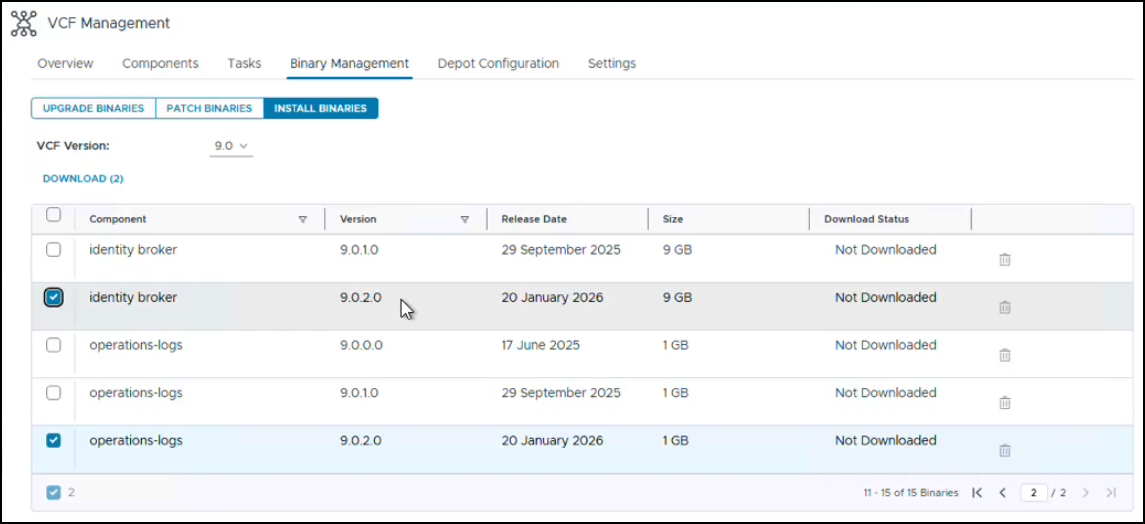
Click the Download button and wait for the download to be completed.
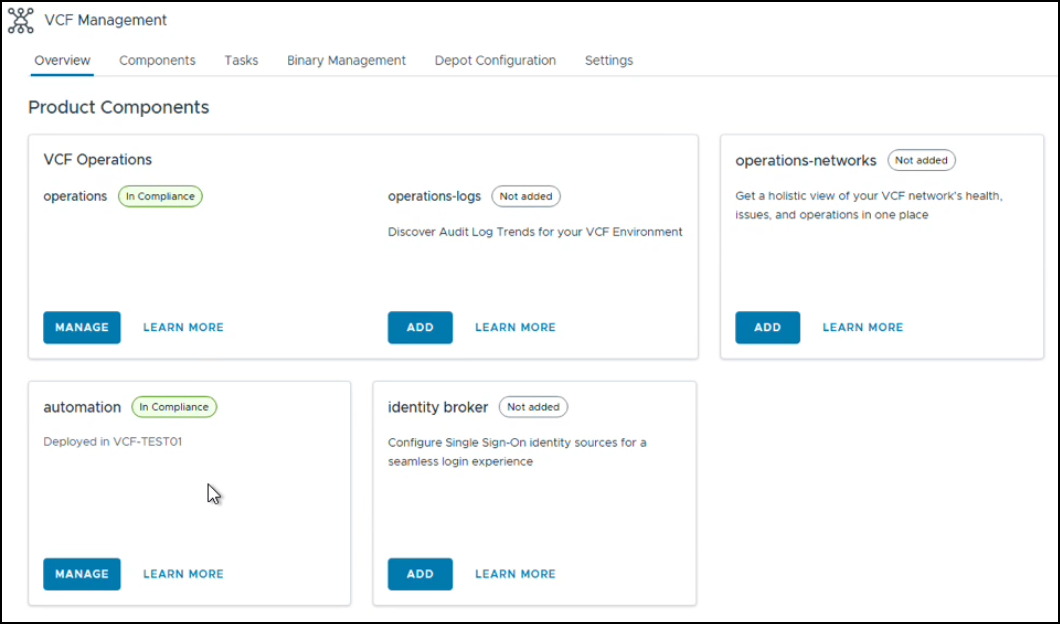
Once done, navigate to Lifecycle > VCF Management > Overview
From this window, you can add VCF Operations for Logs. From the operations-logs window, click Add
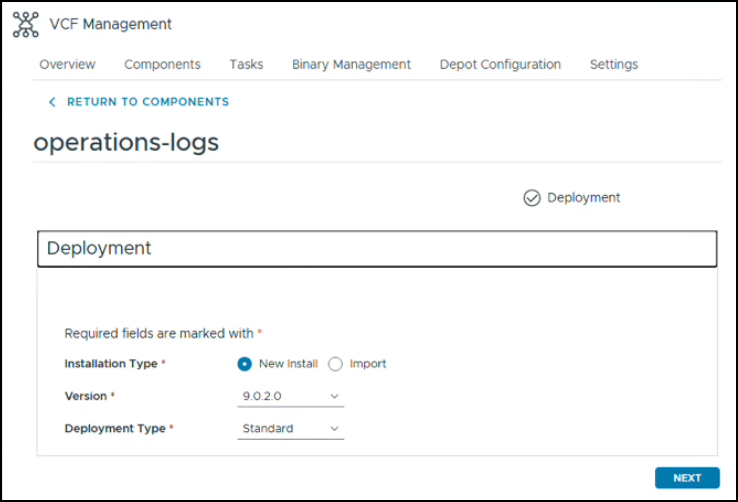
Click the Installation Type (New Install), version (9.0.2.0) and Deployment Type (Standard).
If you would choose for a clustered appliance, choose option ‘Cluster’ instead of ‘Standard’ in the dropdown menu; in the following screens you will then need to add additional node names.
The next screen allows you to select the certificate for the Operations for Logs appliance. You can create a certificate here, or if already uploaded your own certificate in the Certificate Library, select the certificate here.
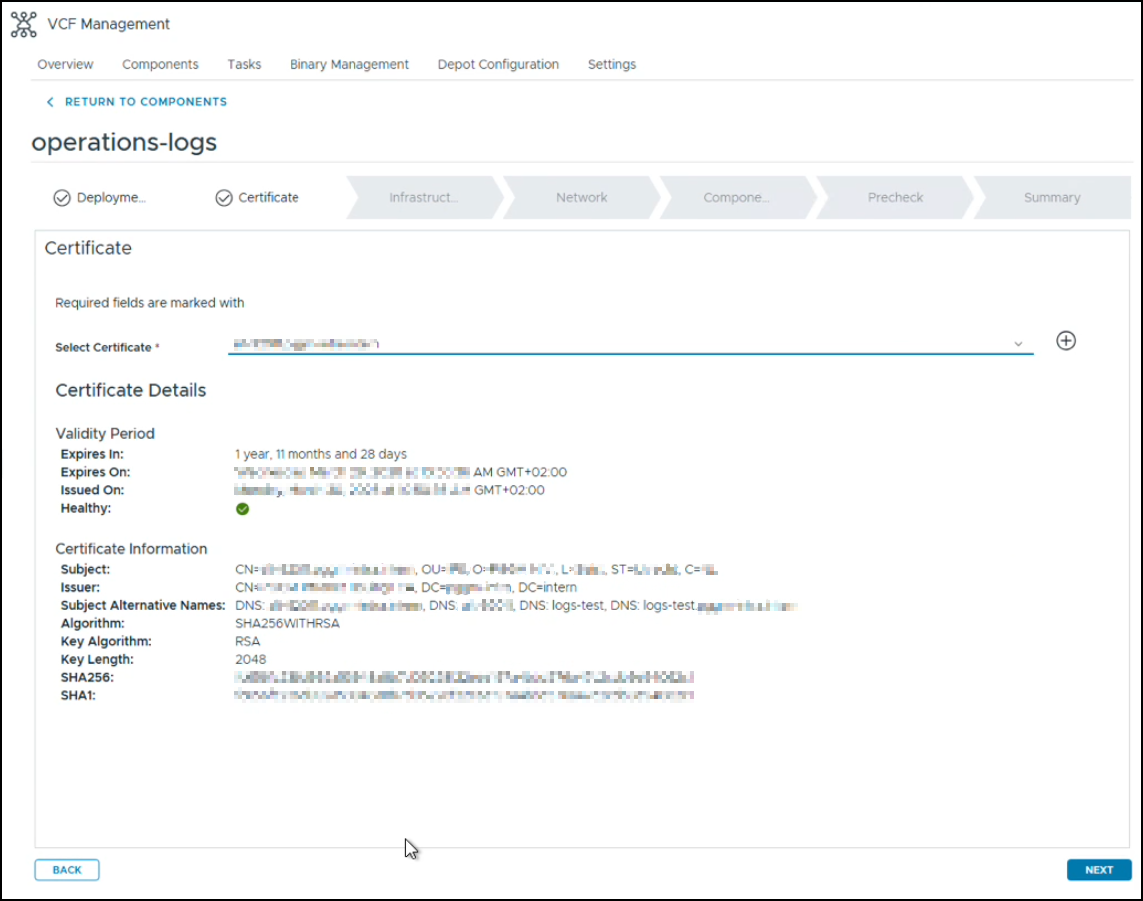
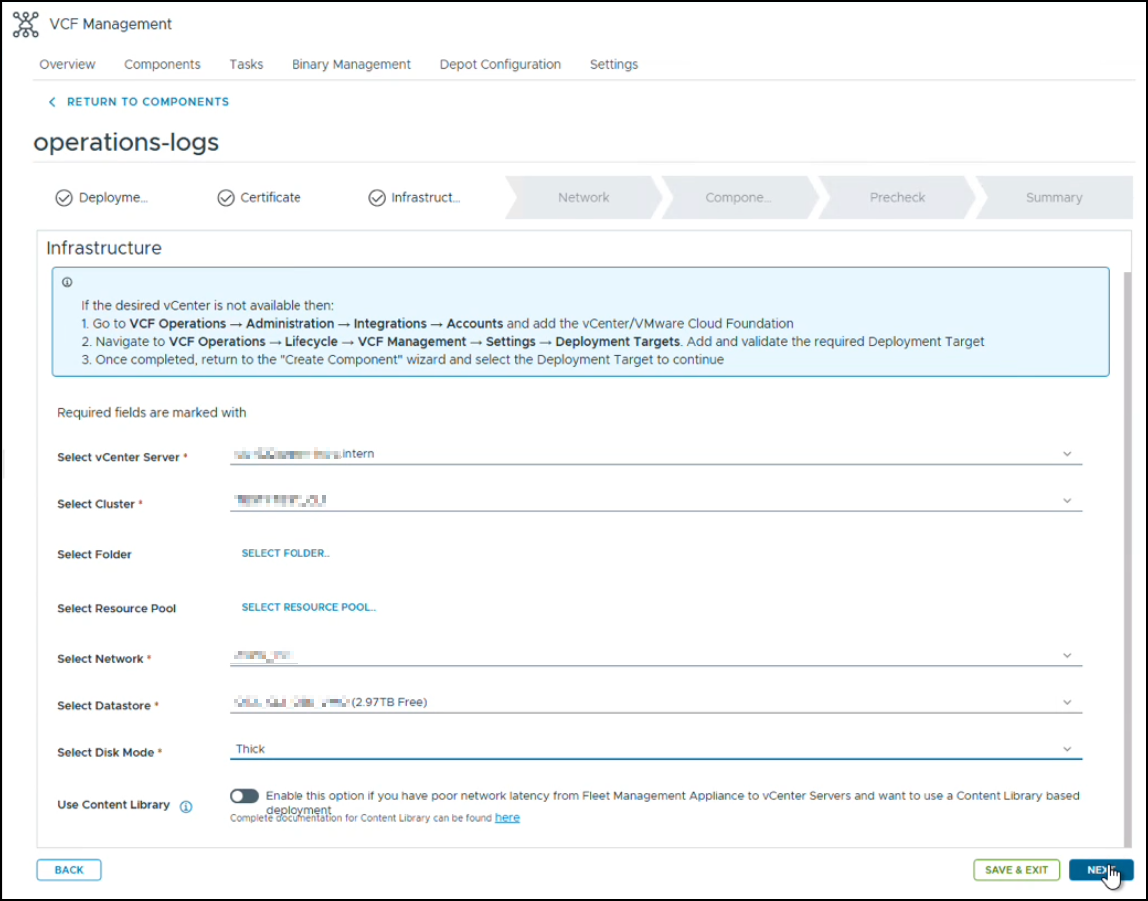
The next screen allows for the selection of Infrastructure resources, such as the vCenter Server, its cluster for deployment, VM Folder and Resource Pool, the Network Portgroup and the Datastore. Depending on the storage backend, choose Thin or Thick provisioned disks.
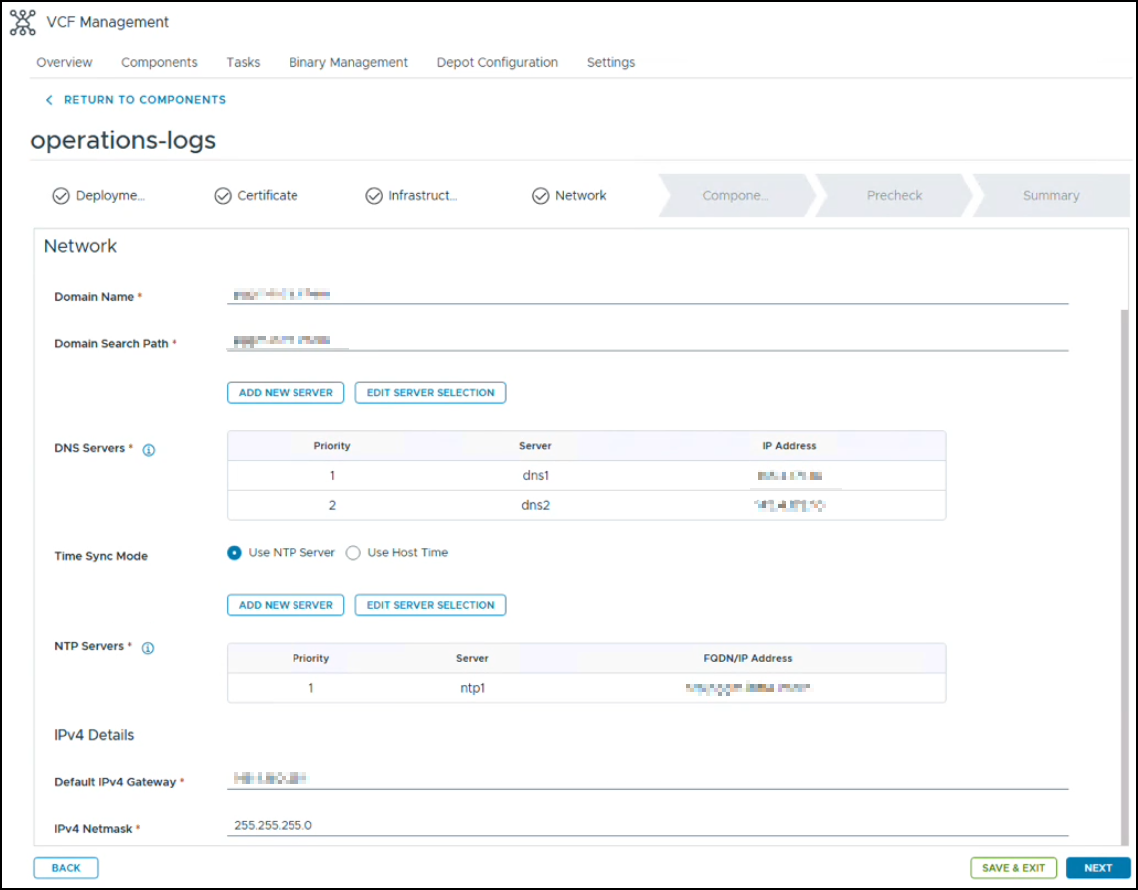
This screen also allows you to configure your Network configuration for VCF Operations for Logs: Domain Name and Search Path, DNS and NTP Servers (Time Sync Mode), from previously added entries and the IPv4 gateway and subnet mask.
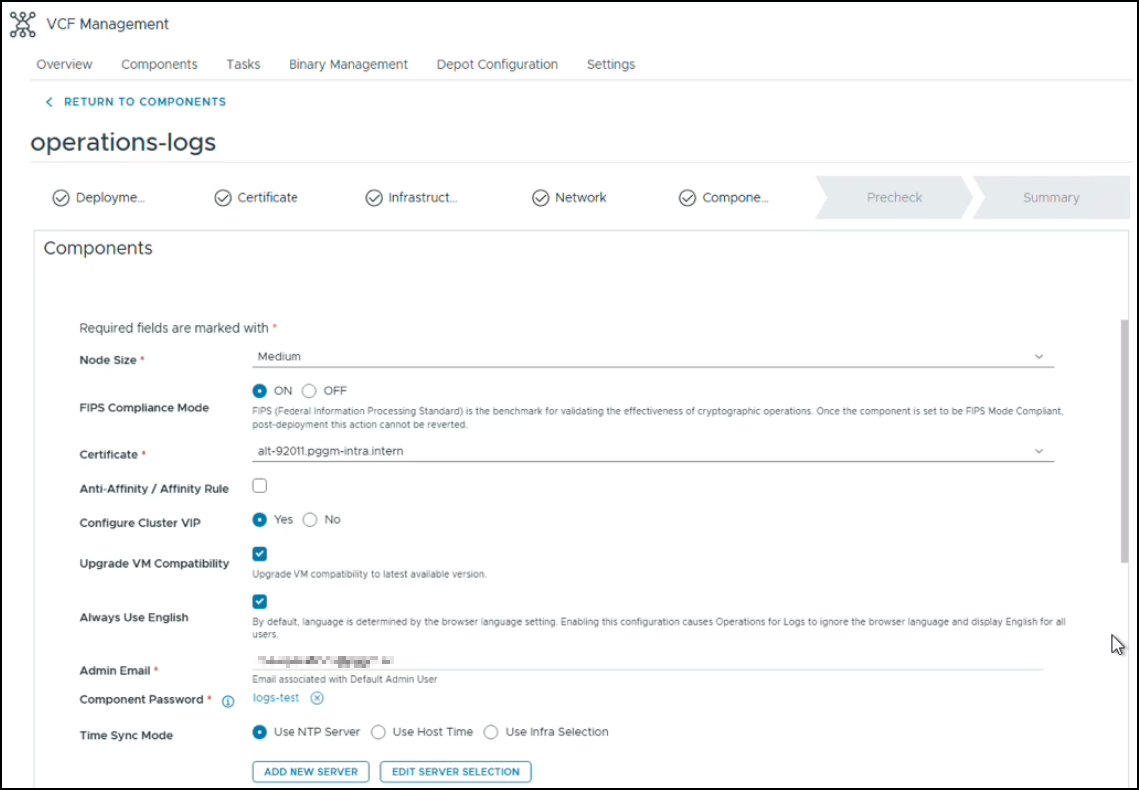
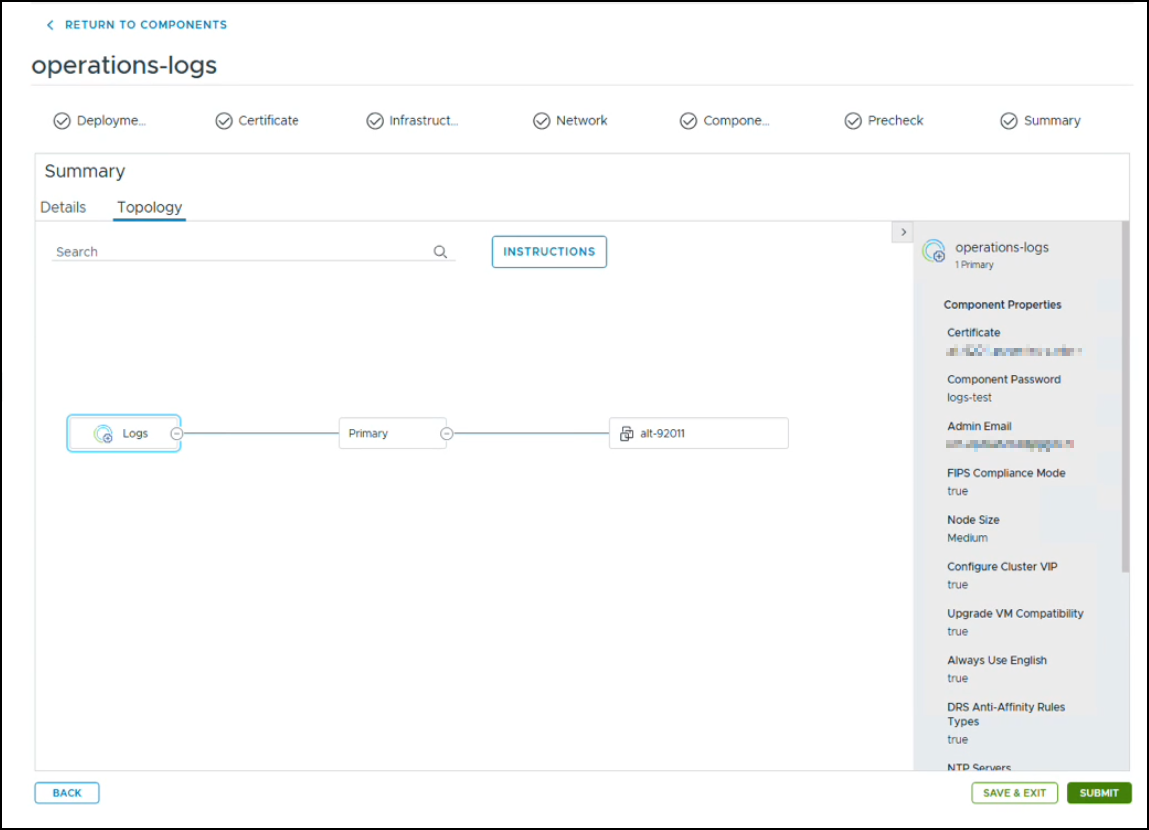
Components : enter the node size, FIP Compliance Mode, any Anti-Affinity / Affinity Rule, whether or not you want to configure a Cluster VIP, Admin Email, definition of the password and Time Sync Mode.
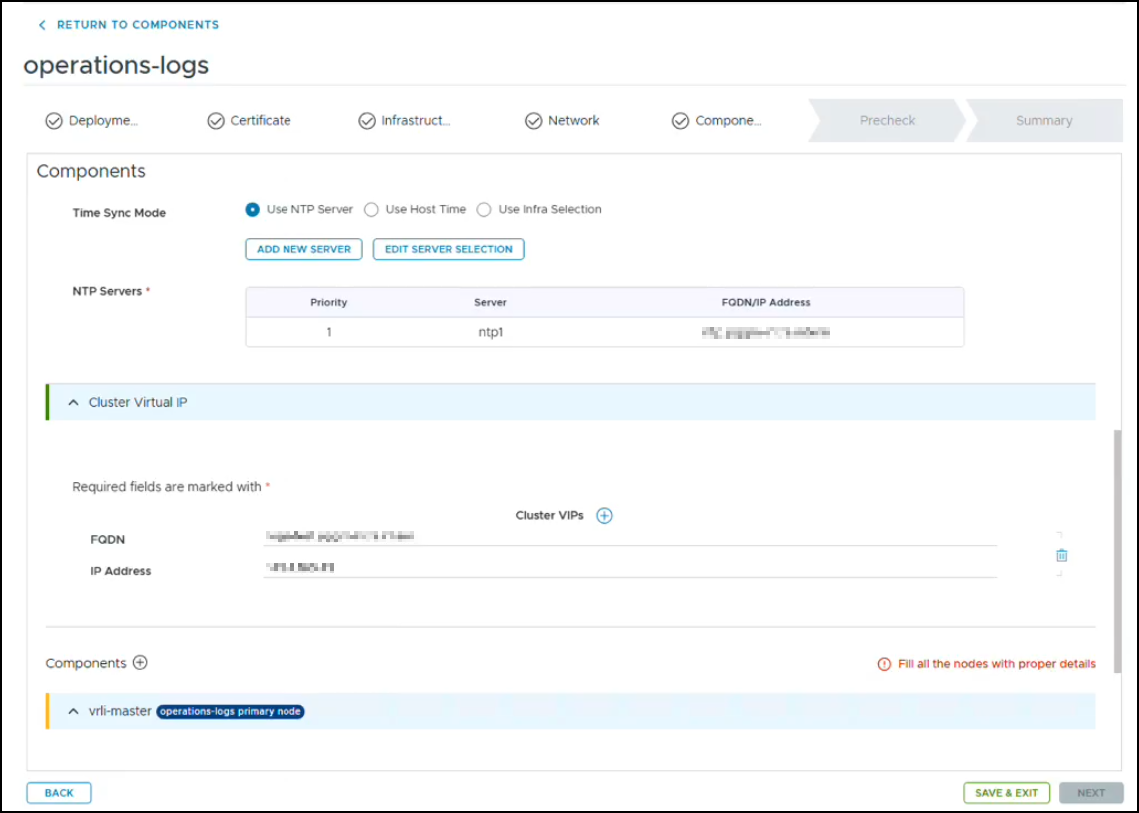
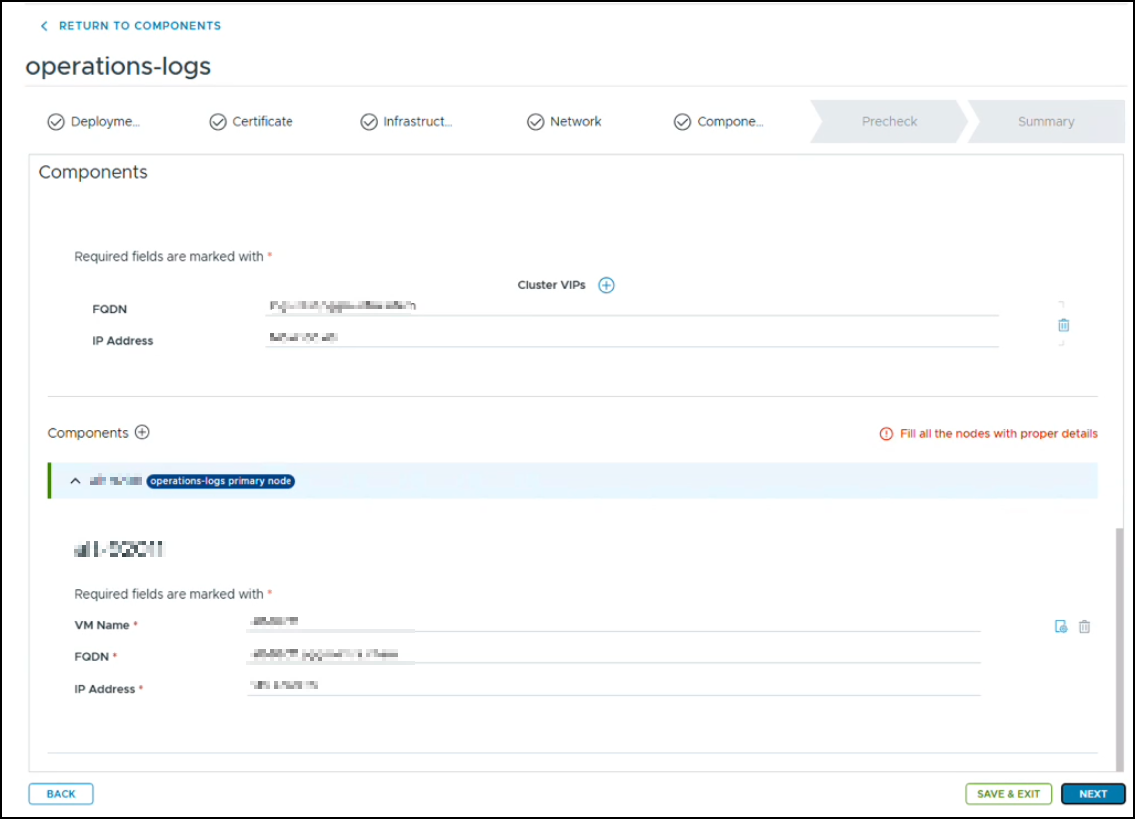
Click Next to run the Precheck Validation
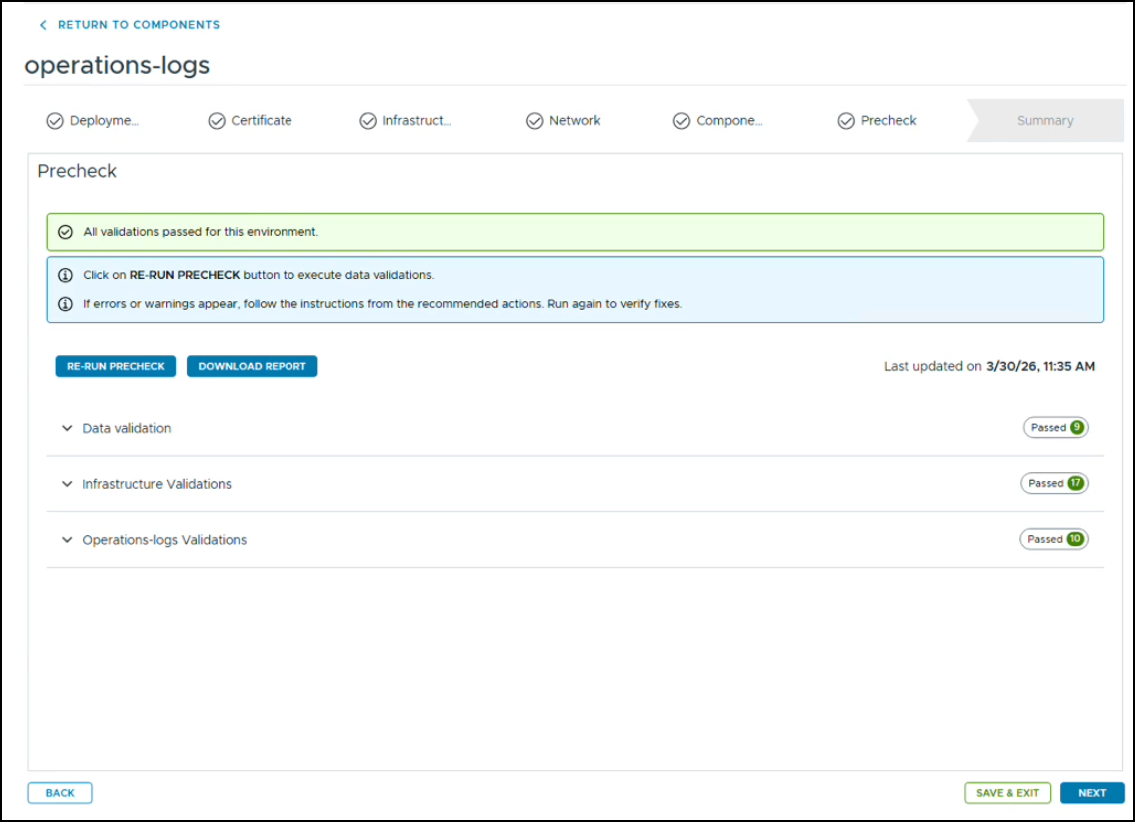
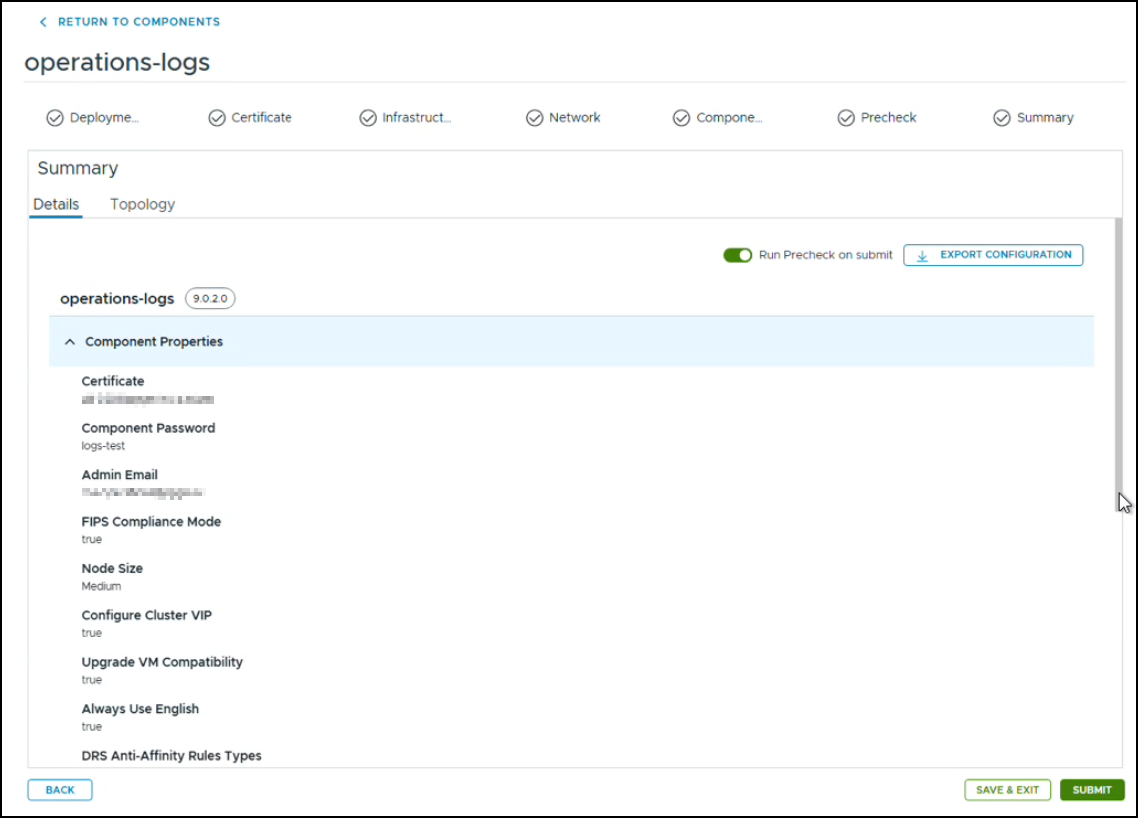
Once validations have passed, check the configuration again and click submit
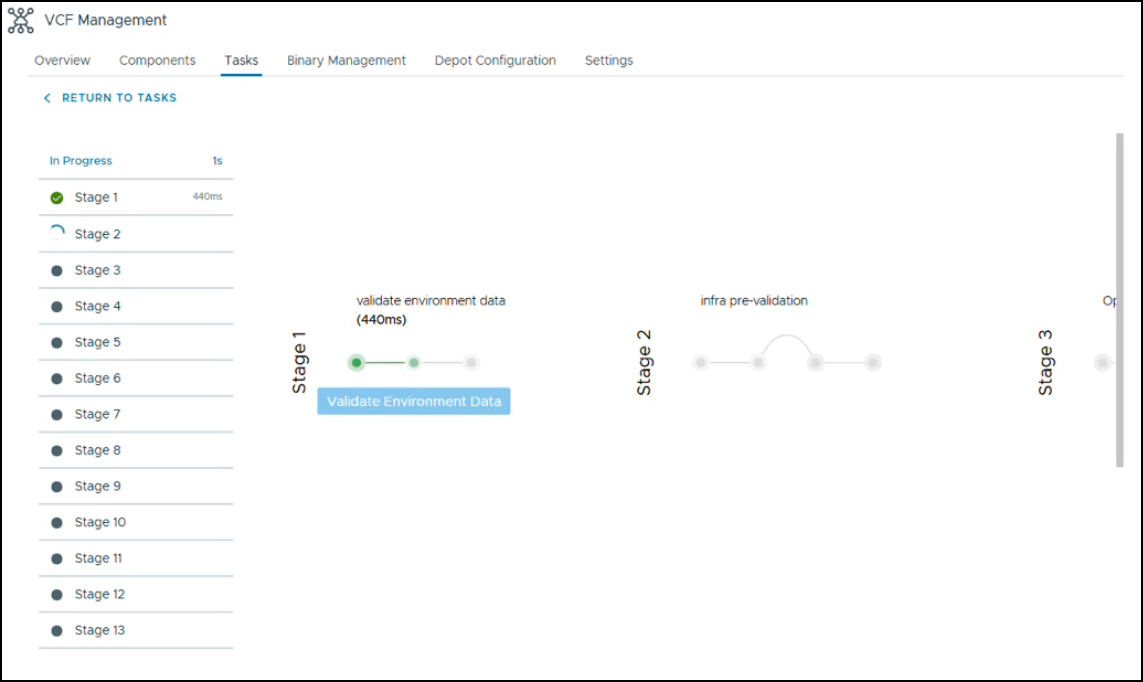
You can monitor its process through the Tasks panel
From Deployment to Day 2 Operations
With the Operations for Logs deployment submitted, VCF takes care of provisioning the appliance and integrating it into the SDDC environment. But deploying the component is only one part of the story. The real value of VCF 9 becomes apparent when you start using the platform to operate, maintain, and evolve the environment.
Day 2 operations are essentially about managing change without losing control. A production SDDC is rarely static: clusters grow, hosts need to be patched, workload domains are expanded, network requirements change, and security policies evolve. VCF provides a centralized framework for handling these changes while maintaining consistency across the different infrastructure components.
Cluster Expansion
One of the most common Day 2 tasks is expanding an existing cluster.
A workload domain may initially be deployed with only the capacity required to get started. As workloads are migrated into the environment, additional compute resources can be added to the cluster through SDDC Manager. Rather than treating the ESXi hosts as individual resources, VCF keeps the operation within the context of the workload domain and its associated cluster.
Before expanding a cluster, several prerequisites should be considered:
- The additional hosts must be compatible with the existing cluster configuration.
- Firmware and driver versions should align with the desired VCF software state.
- The hosts need to have the appropriate networking configuration available.
- vSAN requirements must be considered when the cluster uses vSAN for storage.
- The available IP addresses, DNS records, and other network resources must be planned in advance.
This is an important distinction compared with managing a traditional vSphere environment. In VCF, adding capacity is not simply a matter of installing ESXi and adding a host to vCenter. The host becomes part of a larger, lifecycle-managed SDDC.
SDDC Manager therefore plays an important role in ensuring that the newly added resources are brought into the environment consistently.
Lifecycle Management and Automated Patching
Once the environment is running, lifecycle management becomes one of the most important Day 2 activities.
VCF provides a central lifecycle management mechanism for the components that make up the SDDC. Instead of manually determining which ESXi, vCenter, NSX, and other component versions should be installed together, VCF uses a validated software bill of materials (BOM) to define the desired state.
This is particularly useful when applying updates.
A typical lifecycle operation can involve:
- Checking the available updates.
- Reviewing the target VCF release and associated component versions.
- Validating the environment against the prerequisites.
- Downloading or staging the required bundles.
- Remediating the individual components in the appropriate order.
- Validating the environment after the upgrade.
The orchestration is one of the major benefits of VCF. The administrator does not have to manually coordinate every dependency between vCenter, ESXi, NSX, vSAN, and the other VCF components.
However, automated does not mean unattended.
Before starting a lifecycle operation in production, it is still important to verify that backups are current, workloads can tolerate the planned maintenance, and there is sufficient capacity to handle host maintenance operations. A lifecycle operation should be treated as a controlled change to the SDDC rather than simply clicking an “Update” button.
Maintaining a Consistent Software State
One of the operational advantages of VCF is that the environment has an explicit desired software state.
This becomes increasingly important as the SDDC grows.
Without centralized lifecycle management, it is easy for environments to develop configuration drift. One cluster might be running a slightly different ESXi build, another might have a different NSX version, and firmware or driver versions can gradually diverge.
VCF is designed to prevent this type of operational drift by managing the SDDC as an integrated platform.
For administrators, this changes the operational mindset from:
“Is this host running the version I expect?”
to:
“Is this workload domain compliant with the desired VCF state?”
That distinction becomes particularly valuable when managing multiple workload domains.
Backup and Recovery
Lifecycle management is only one side of Day 2 operations. Backup and recovery planning is equally important.
A VCF environment contains multiple management components, and protecting only the workloads is not sufficient. The management plane itself needs to be recoverable.
At a minimum, consider protection for:
- vCenter Server
- NSX Manager
- SDDC Manager
- Operations components
- Workload virtual machines
- Configuration and identity information required to rebuild the environment
The exact backup strategy will depend on the environment and the organization’s recovery objectives. In particular, administrators should distinguish between VM-level backup and platform recovery.
A VM backup allows an individual workload to be restored. It does not automatically mean that the complete VCF management stack can be recovered.
This is why backup validation is just as important as backup configuration. A backup that has never been tested is an assumption, not a recovery strategy.
Network and Security Adjustments
Day 2 operations also inevitably involve changes to networking and security.
NSX provides the networking and security foundation for VCF workload domains, but requirements rarely remain unchanged after the initial deployment. New applications may require additional segments, firewall rules may need to be adjusted, and security policies may evolve as workloads are migrated into the environment.
Changes should therefore be made with the complete application flow in mind.
For example, adding a new application segment may require more than simply creating a logical segment. Depending on the architecture, you may also need to consider:
- DHCP and DNS requirements
- Tier-1 gateway connectivity
- Distributed firewall policies
- North-south connectivity
- Load balancing
- Routing
- Security groups and dynamic membership
- Integration with external services
This is another area where centralized management becomes valuable. The infrastructure components are interconnected, and a seemingly small change at one layer can have consequences elsewhere.
Operating Multiple Workload Domains
The complexity of Day 2 operations increases significantly once multiple workload domains are involved.
A single workload domain is relatively easy to reason about. Multiple domains introduce additional considerations around capacity, lifecycle management, networking, security, and operational ownership.
It is tempting to treat each workload domain as a completely independent vSphere environment. Operationally, however, they are still part of the same VCF platform.
A few practices help keep the environment manageable:
- Keep versions aligned.
Avoid allowing individual workload domains to drift unnecessarily far apart in their software state. - Document dependencies.
Know which services, networks, identity providers, backup systems, and external integrations are shared between domains. - Plan capacity globally.
A host failure or maintenance operation in one domain can have different implications depending on the available capacity and workload distribution. - Use consistent naming and configuration conventions.
This becomes increasingly important as the number of clusters, segments, networks, and security objects grows. - Avoid manual configuration where VCF can manage the lifecycle.
Manual changes can introduce configuration drift and may complicate future upgrades.
Common Day 2 Pitfalls
Most Day 2 problems are not caused by the technology itself. They are usually caused by changes being made without considering the larger VCF architecture.
A few common pitfalls are worth highlighting.
- Treating VCF like standalone vSphere
VCF contains vSphere, but it should not be operated as if it were simply a collection of independent vSphere environments.
Whenever possible, use the VCF management and lifecycle workflows instead of bypassing them with manual changes. - Forgetting capacity during maintenance
A cluster may appear to have sufficient resources during normal operation but become constrained when one or more hosts enter maintenance mode.
Always consider N+1 requirements and the actual workload utilization before starting maintenance or lifecycle operations.
Making undocumented manual changes
Manual configuration changes can solve an immediate problem while creating a future lifecycle-management problem.
If a change is necessary, document it and understand whether it is supported and how it will behave during the next VCF upgrade.
Treating backups as a checkbox
Configuring a backup job is not the same as having a tested recovery process.
Recovery procedures should be documented and periodically validated, particularly for the VCF management components.
Ignoring dependencies
VCF components are tightly integrated. DNS, NTP, certificates, networking, identity, and storage are foundational services. Problems in these areas can manifest themselves as failures in seemingly unrelated VCF workflows.
The Day 2 Mindset
The biggest change when moving from Day 1 to Day 2 is the operational mindset.
During deployment, the objective is to build the SDDC.
During Day 2 operations, the objective is to maintain a desired state while the SDDC continuously changes.
That means lifecycle management, monitoring, backup, capacity planning, security, and change management all become part of the same operational process.
Operations for Logs can provide additional visibility into what is happening across the environment, while SDDC Manager provides the central point for many of the lifecycle and infrastructure operations. Together with vCenter, NSX, vSAN, and the other VCF components, they form an operational framework rather than a collection of individual products.
The result is a fundamentally different way of managing the SDDC. Instead of manually maintaining each infrastructure component, the administrator works with the VCF platform to maintain consistency across the entire environment.
Conclusion
Deploying VCF 9 is only the beginning. Once the management domain and workload domains are up and running, the focus shifts from building the environment to operating it.
Cluster expansion provides a controlled way to add capacity. Lifecycle management keeps the infrastructure on a validated software state. Backup and recovery protect the management plane and workloads, while NSX provides the flexibility to evolve networking and security as application requirements change.
The more workload domains are added, the more important these centralized operational practices become. Consistency, documentation, lifecycle awareness, and careful capacity planning prevent a VCF environment from gradually turning into a collection of individually managed silos.
That is ultimately what makes Day 2 operations such an important part of VCF 9: the value of the platform is not only in how quickly you can deploy an SDDC, but in how consistently you can operate, scale, secure, and maintain it over its entire lifecycle.